Chrome extension
Prep for the job you're looking at
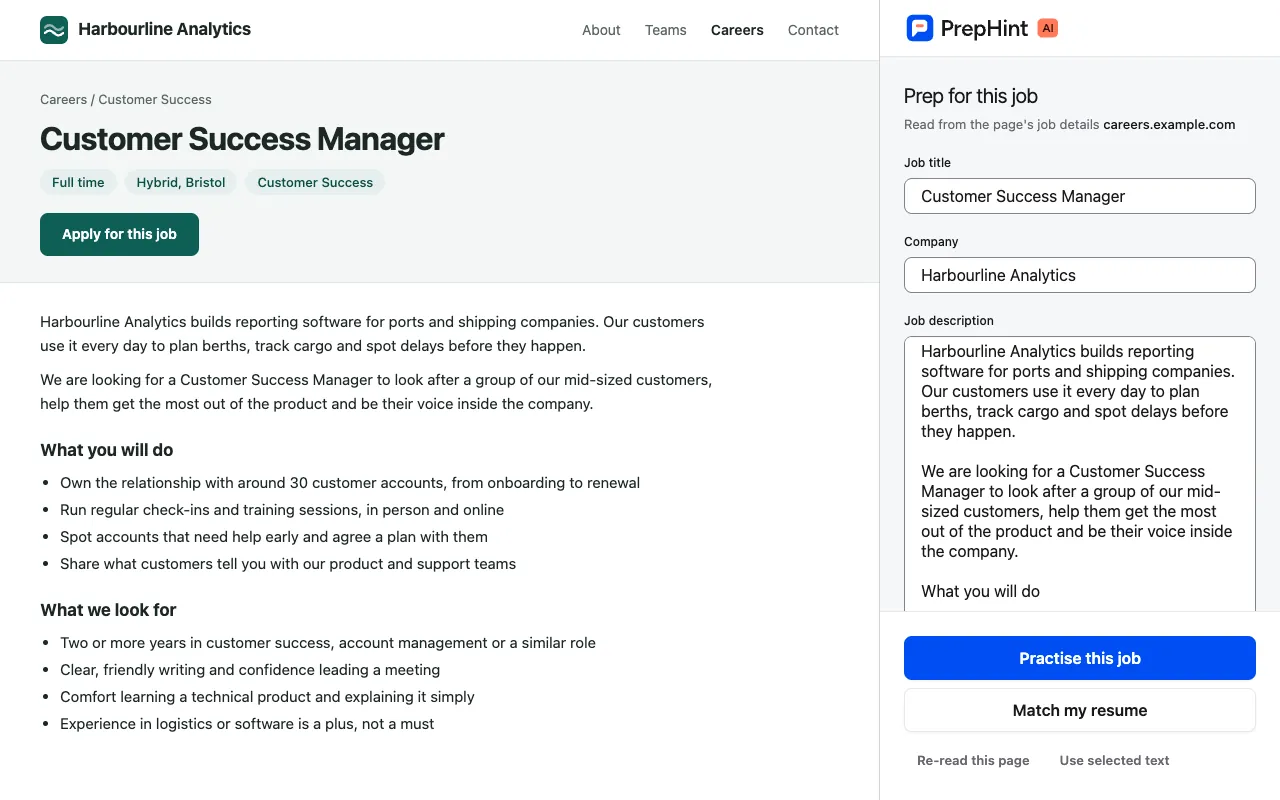
Open a job post and click the PrepHint AI icon. A side panel reads the title, the company and the description. Check them, fix anything that looks wrong, then practise a mock interview for that job or match your resume to it.
Add to Chrome (opens in a new tab)
For Google Chrome on a computer. The button opens the Chrome Web Store.
How it works
Open a job post
Go to the job post in Chrome. PrepHint AI reads a page only when you ask: click its icon, use the keyboard shortcut or use the right-click menu.
Check what it found
A side panel opens next to the page with the title, the company and the description. Edit anything that looks wrong. If a page cannot be read, select the job text on the page and use that instead.
Choose what to do next
Practise this job starts a voice mock interview with an AI interviewer built around that role. Match my resume opens the free resume checker with the posting already filled in.
Good to know
- Kept in your account
- Sign in to PrepHint AI when it asks. Your account keeps what you send, so you can come back to it.
- Your privacy
- It never reads your cookies, your browsing history, your other tabs or what you type into forms, and it does not fill in forms. The posting goes to PrepHint AI only when you press Practise this job or Match my resume.
Read the privacy notice
Use it where AI help is allowed
PrepHint AI is made for practice and for conversations where help from AI is allowed. Check the rules of the employer and the interviewer before you use it in a real interview. If the answer is no, use it to practise.